
Step by step
1. Get API access from each distributor
If you don't have API access yet, ask your rep for read-only price and availability API access. Most reps turn it on within one to three business days.
- Ingram Micro: ask your Ingram rep for Reseller API access. You'll get a client ID, a client secret and your customer number.
- TD SYNNEX: ask your rep for API access. You'll use your account number plus an API username and password. TD SYNNEX may also ask for the IP address calls come from. Email us and we'll send the current one for your rep.
- D&H: ask your D&H rep for API access. You'll get a tenant, a client ID and a client secret, and you'll use your account number.
2. Open the Distributors page
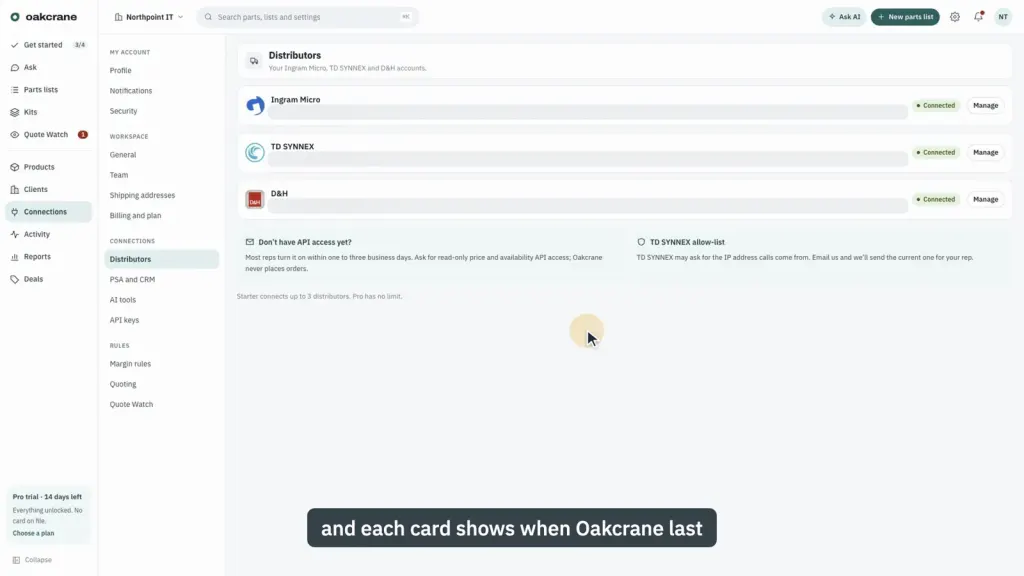
In Oakcrane, click Connections in the left sidebar. It opens Settings, on the Distributors page under Connections.
Each distributor has its own card. A connected card shows a Connected pill and when Oakcrane last checked it. The two help cards below, Don't have API access yet? and TD SYNNEX allow-list, repeat the advice above.
3. Open a card and enter its details
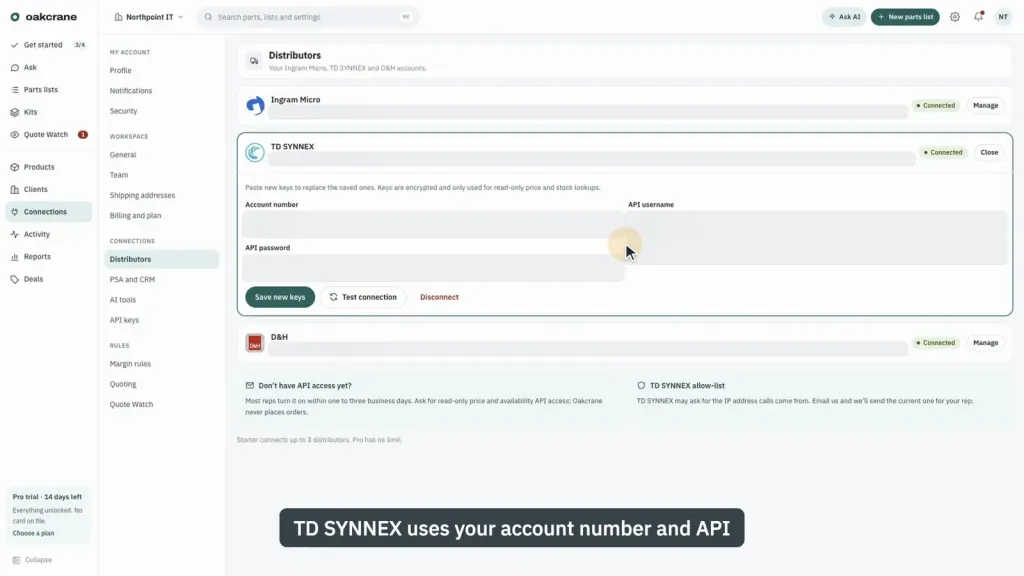
Click Connect on the distributor's card (it says Manage if it's already connected). A form opens with the fields that distributor needs:
| Distributor | Fields | |---|---| | Ingram Micro | Client ID, Client secret, Customer number, Country code (defaults to US) | | TD SYNNEX | Account number, API username, API password | | D&H | Tenant (for example dhus), Client ID, Client secret, Account number |
Paste each value exactly as your distributor sent it.
4. Click Connect and confirm
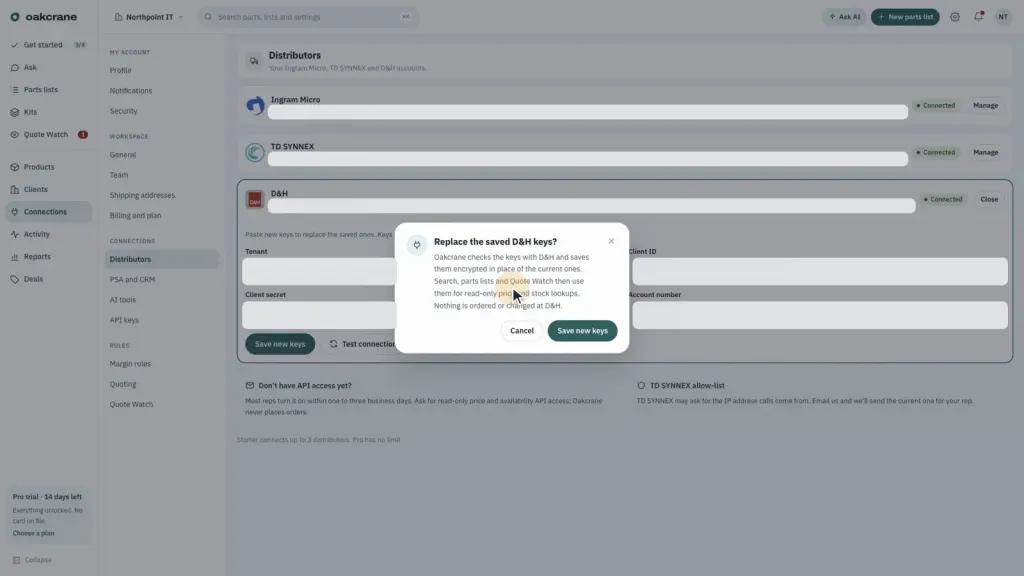
Click Connect. Oakcrane asks you to confirm before it saves anything. The dialog explains that it checks the keys with the distributor, saves them encrypted, and uses them only for read-only price and stock lookups.
Click Connect in the dialog. If the keys work, the card turns Connected. If you are replacing keys on a connected card, the buttons say Save new keys instead.
5. Test a connection at any time
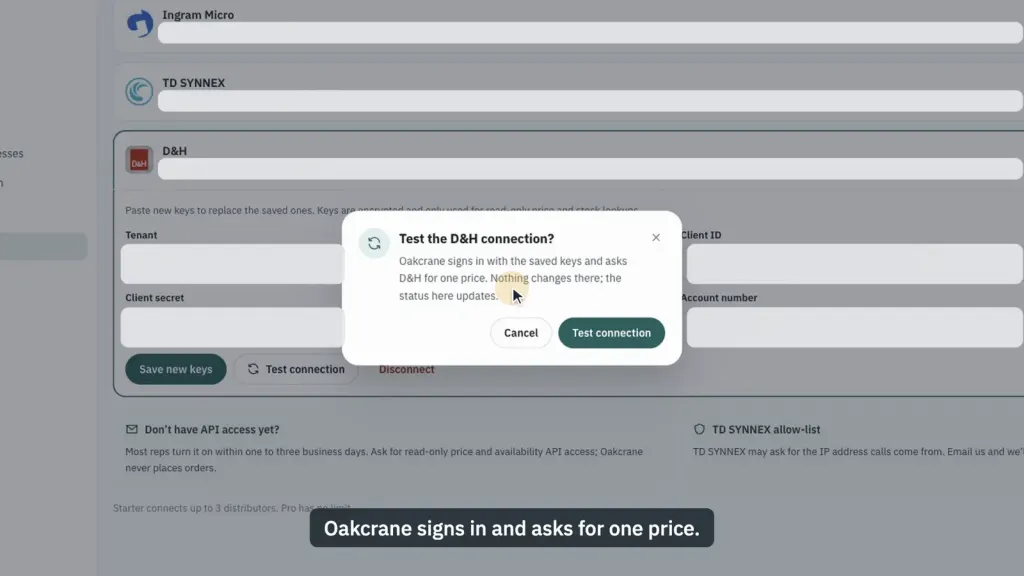
Open a connected card and click Test connection, then confirm. Oakcrane signs in with the saved keys and asks the distributor for one price. Nothing changes at the distributor. You see a message such as "D&H is working." and the card status updates.
If saved keys stop working, the card shows Reconnect needed and the Products page shows a notice too. Click Reconnect on the card and paste the keys again.
6. Search across all of them
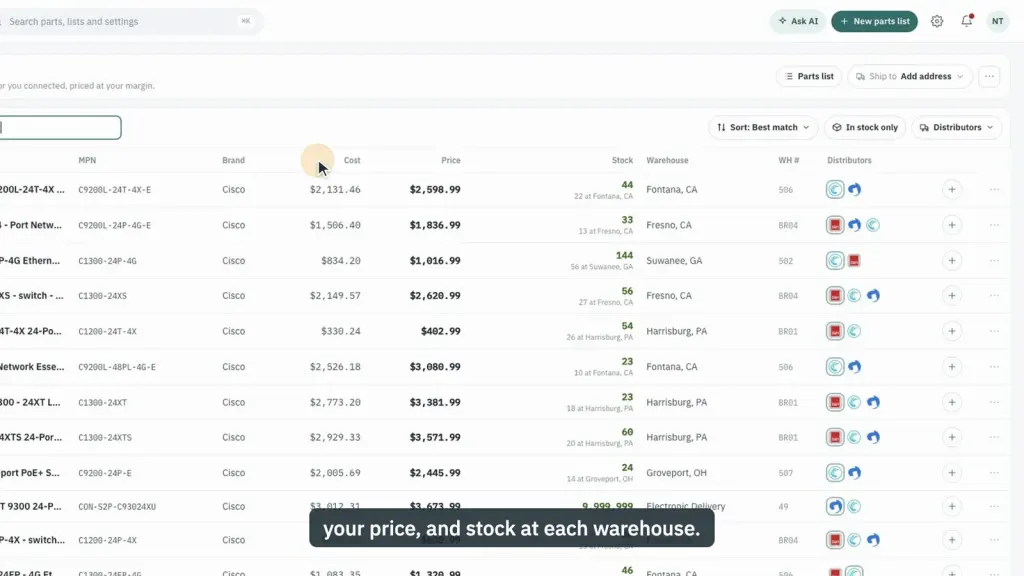
Open Products and search by part number or description. Oakcrane checks every connected distributor at once and shows your cost, your price after margin rules, and stock at each warehouse, with the distributors that carry each part.
Tips
- Ask for read-only price and availability access. Oakcrane never needs ordering rights.
- The Starter plan connects up to 3 distributors. Pro has no limit.
- Only remove a connection with Disconnect if you mean to. Search, parts lists and Quote Watch stop checking that distributor, and you'll need the API keys again to reconnect.
Questions
Can Oakcrane place orders with my distributor?
No. The keys are only used for read-only price and stock lookups. Oakcrane never places orders or changes anything at your distributor.
How long does it take to get API access?
Most reps turn it on within one to three business days. Ask for read-only price and availability API access.
TD SYNNEX asked for our IP address. What do I send?
Email Oakcrane support and we'll send the current IP address that calls come from, so you can pass it to your rep for their allow-list.
Where are my keys stored?
Oakcrane checks them with the distributor and saves them encrypted. You can replace them at any time with Save new keys.
Transcript
0:03Oakcrane works with your own distributor accounts.
0:06You connect Ingram Micro, TD SYNNEX, and D&H with your API keys.
0:11ScanSource is coming next.
0:13Once a distributor is connected, Oakcrane reads your live cost and stock, warehouse by warehouse.
0:19Search, parts lists and Quote Watch all use it.
0:23The keys are only used for read-only lookups.
0:25Oakcrane never places orders or changes anything at your distributor.
0:33To connect one, open Connections, then Distributors.
0:38Each distributor has its own card.
0:40In this workspace, all three are already connected, and each card shows when Oakcrane last checked it.
0:46Each distributor asks for different details.
0:49For Ingram Micro, it's a client ID, a client secret, your customer number and your country.
0:56TD SYNNEX uses your account number and API login.
1:01D&H uses a tenant, a client ID and secret, and your account number.
1:08Paste your keys and click Connect.
1:11Oakcrane asks you to confirm, checks the keys with the distributor, and saves them encrypted.
1:22You can test a connection at any time.
1:25Oakcrane signs in and asks for one price.
1:28Nothing changes at the distributor.
1:33If saved keys stop working, the card says Reconnect needed, and Products shows a notice too, so you know to paste them again.
1:43No API access yet?
1:46Ask your rep for read-only price and availability access.
1:49Most reps turn it on within one to three business days.
1:59Now open Products and search.
2:02Oakcrane checks every connected distributor at once, and shows your cost, your price, and stock at each warehouse.


