
Step by step
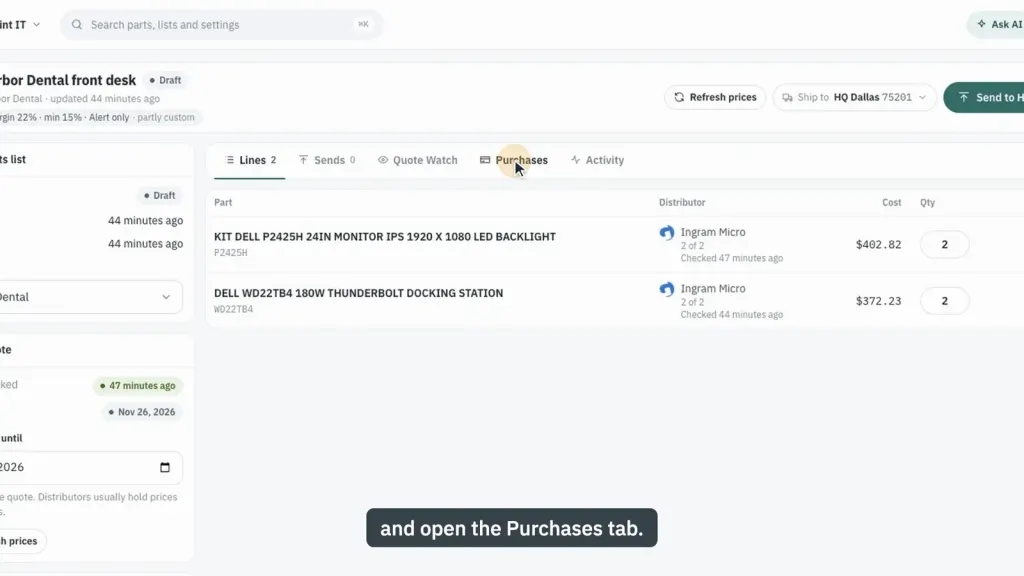
1. Open the Purchases tab
Open a parts list that has been sent or won. Click the Purchases tab. It only appears on sent or won lists.
Each line shows what you quoted, what you've bought so far and the actual unit cost.
2. Record what you bought
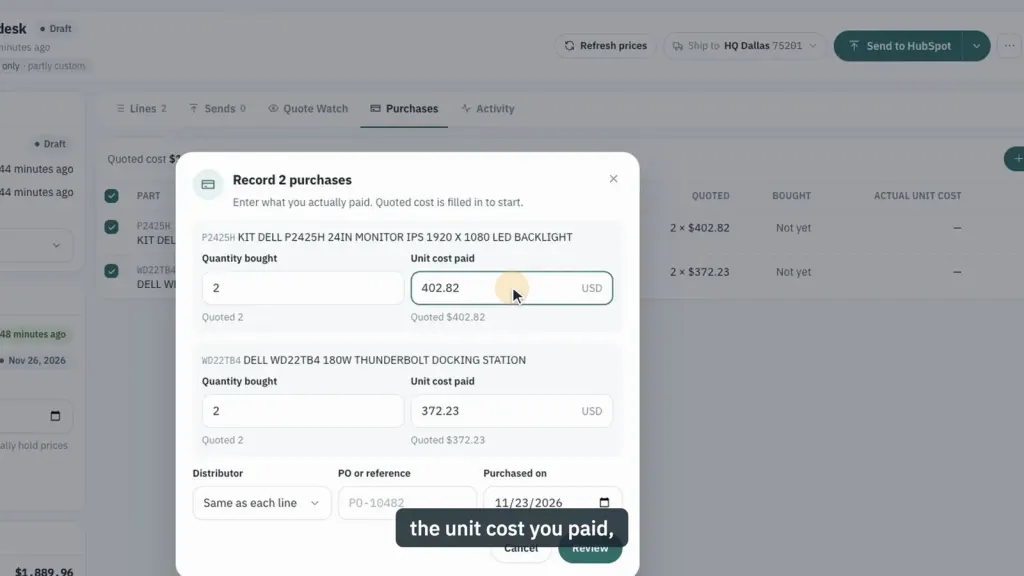
Tick the lines you bought and click Record 2 selected (or Record purchases). The quoted cost is filled in to start. For each line enter:
- Quantity bought
- Unit cost paid
Then set the Distributor, a PO or reference such as PO-10482, and Purchased on. Click Review.
3. Review and record
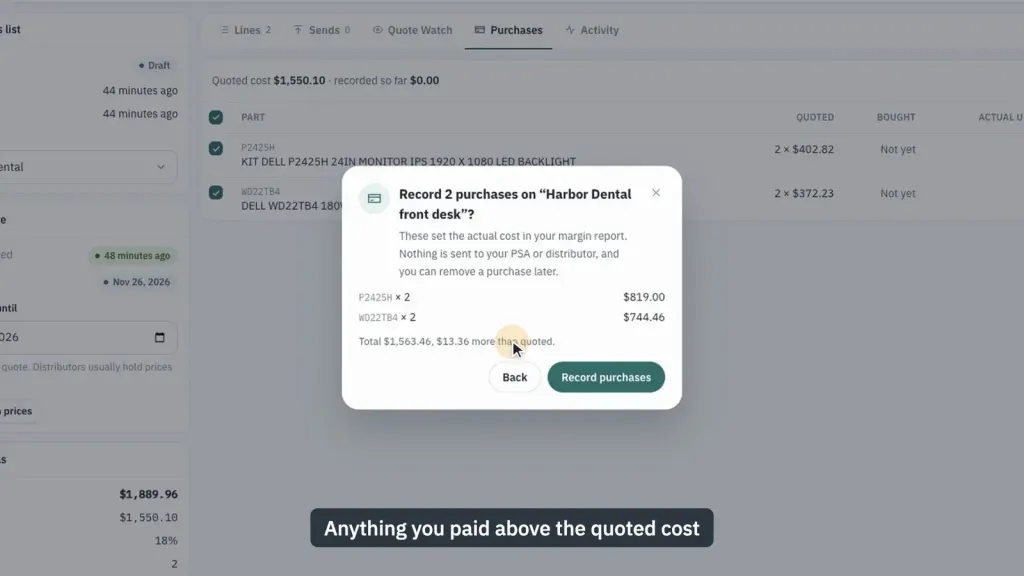
The confirm dialog shows each line and the total, and how much more than quoted you paid. Nothing is sent to your PSA or distributor. Click Record purchases.
Anything you paid above the quoted cost counts as leaked margin. You can remove a purchase later from the same tab.
4. Open Reports
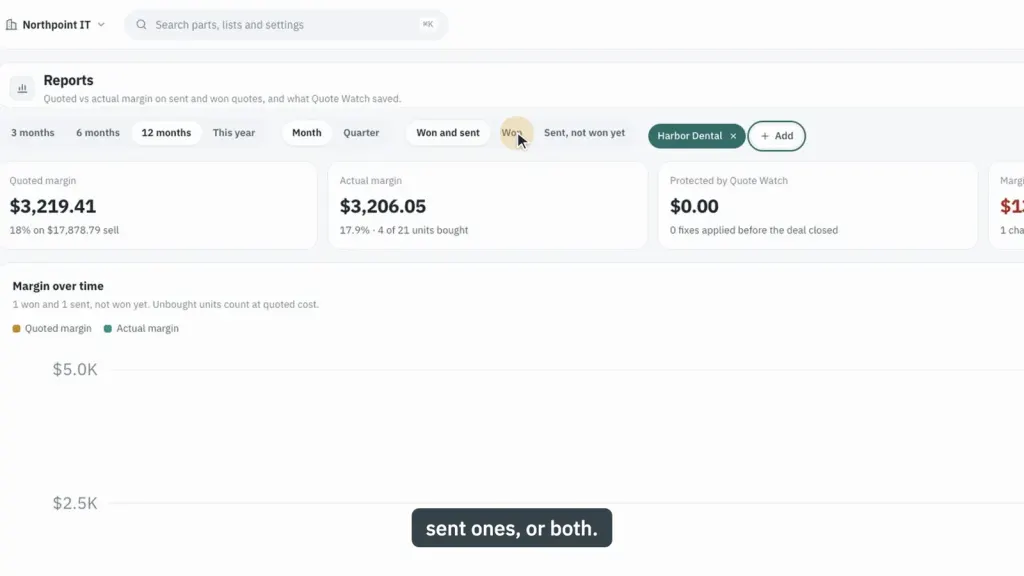
Click Reports in the sidebar. Across the top are four numbers:
- Quoted margin
- Actual margin
- Protected by Quote Watch: margin you kept by applying fixes before the deal closed.
- Margin leaked: a cost rise that wasn't fixed before the win, or a purchase above the quoted cost.
Use the filters to pick a date range (3 months, 6 months, 12 months, This year), group by Month or Quarter, choose Won and sent, Won or Sent, not won yet, and narrow to one client.
5. Drill into a parts list
Margin over time charts quoted and actual margin. Below it the same numbers appear By month or By quarter, By client and by Parts lists.
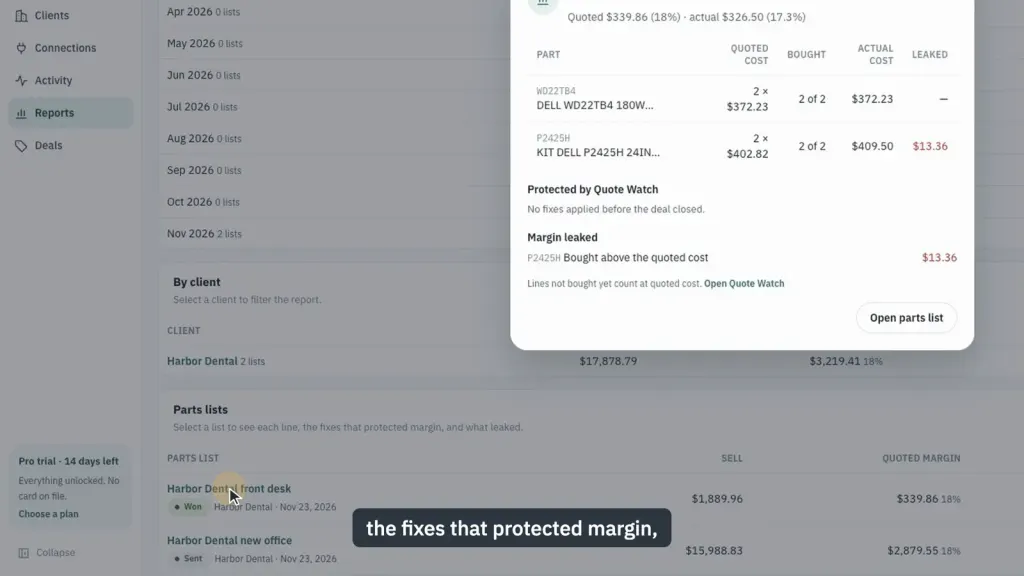
Select a parts list to see each line with quoted cost, bought, actual cost and leaked, plus the fixes that protected margin. Click Open parts list to go to it.
Tips
- Units you haven't bought yet count at the quoted cost, so the report is useful from the first day.
- Lost quotes are left out of the report.
- Reports only shows to roles with the margin permission.
Questions
Do I have to record every purchase?
No. Unbought units count at the quoted cost. Recording purchases makes actual margin and leaked margin more accurate.
What does Protected by Quote Watch mean?
Margin you kept because a Quote Watch fix was applied before the deal closed, for example a price raised after a cost rise.
Does recording a purchase create a PO with my distributor?
No. It only records what you paid in Oakcrane. Nothing is sent to your PSA or your distributor.
Transcript
0:03The margin you quote isn't always the margin you make.
0:06Costs move after you send, and sometimes you pay more than you quoted.
0:11Oakcrane compares the two.
0:13Record what you actually paid, and Reports shows quoted against actual margin, and what Quote Watch protected along the way.
0:23Start on a sent or won parts list, and open the Purchases tab.
0:27Each line shows what you quoted, and what you've bought so far.
0:32Select the lines you bought, and click Record purchases.
0:35Quoted cost is filled in to start.
0:40Enter the quantity, the unit cost you paid, the distributor, and a PO number.
0:52Review it, and record.
0:53Anything you paid above the quoted cost counts as leaked margin.
1:06Now open Reports.
1:09Across the top: quoted margin, actual margin, what Quote Watch protected, and what leaked.
1:18Protected is margin you kept by applying fixes before the deal closed.
1:23Leaked is a cost rise that wasn't fixed before the win, or a purchase above the quoted cost.
1:29Pick a date range, group by month or quarter, and choose won deals, sent ones, or both.
1:36The chart shows quoted and actual margin over time.
1:40Below it, the same numbers by client, and by parts list.
1:48Select a parts list to see each line, the fixes that protected margin, and what leaked.
1:59Units you haven't bought yet count at the quoted cost, so the report is useful from the first day.
2:06That's margin reports.
2:07Next, use Oakcrane right inside Claude.


