
Step by step
1. Copy the connector URL
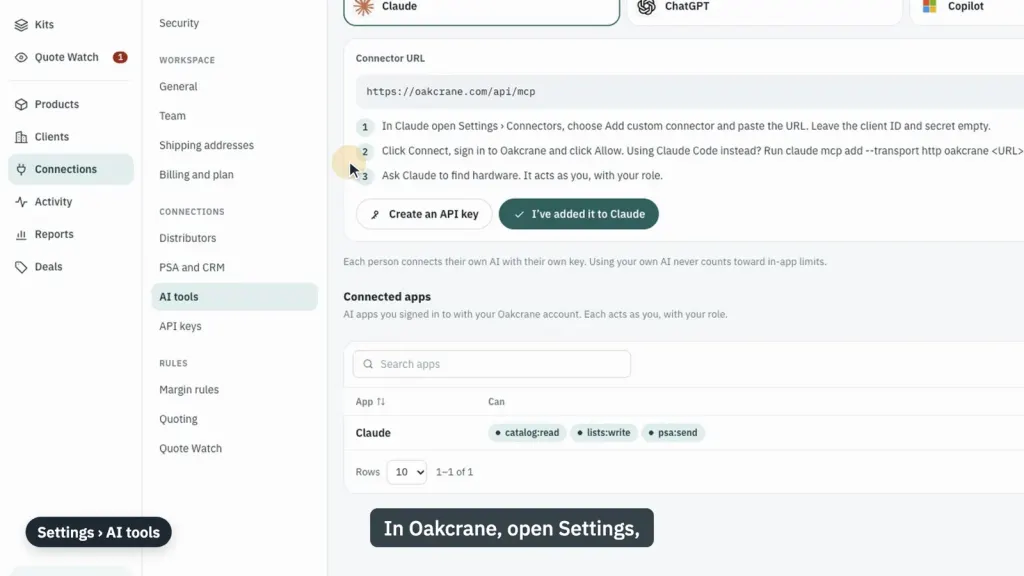
In Oakcrane, open Settings, then AI tools. Pick your AI: Claude, ChatGPT, Copilot or Grok. The steps for that tool appear below.
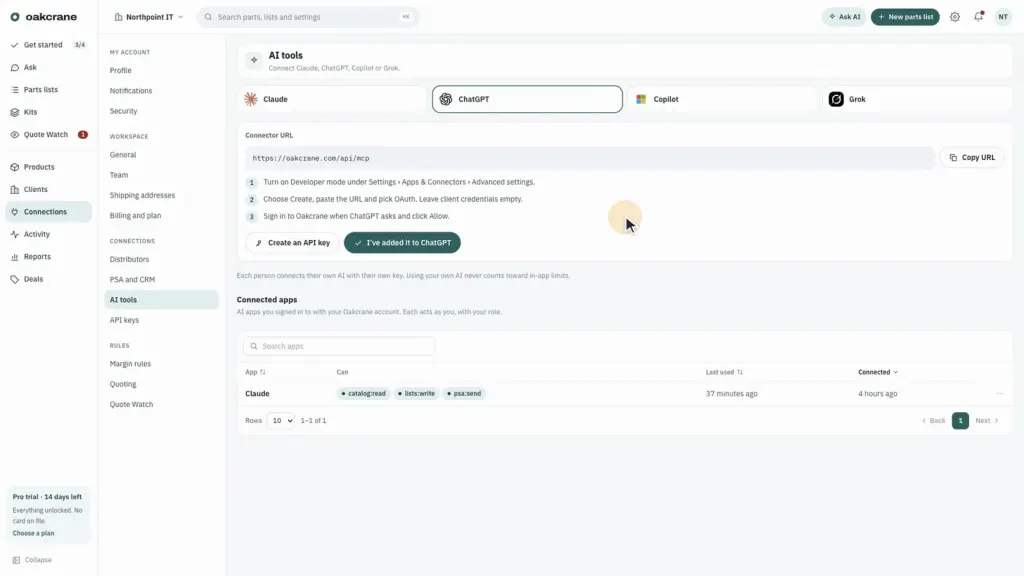
Click Copy URL to copy the connector URL:
https://oakcrane.com/api/mcpEach person on your team connects their own AI with their own Oakcrane account.
2. Claude: add the custom connector
This works in claude.ai and the Claude desktop app.
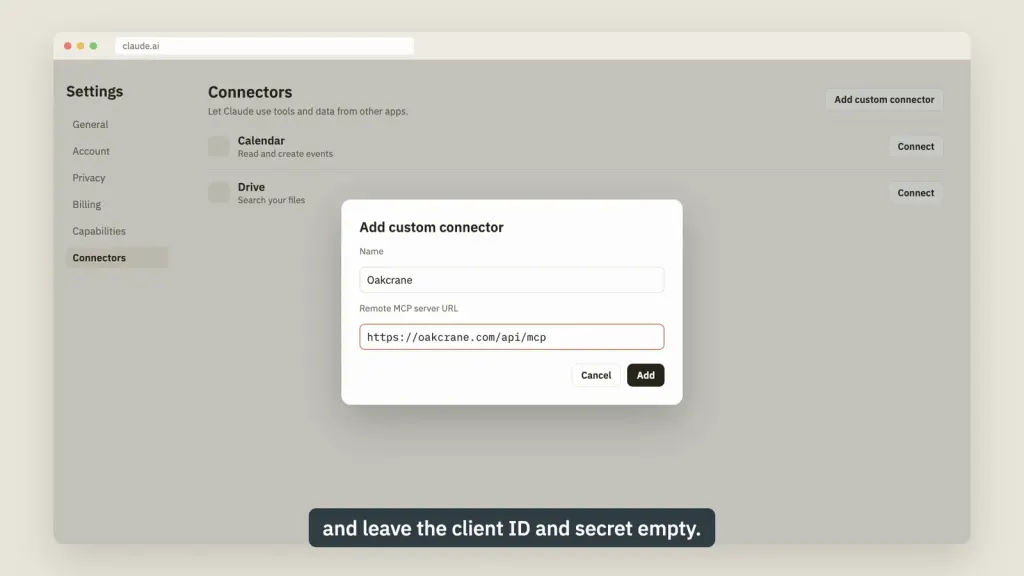
- In Claude, open Settings, then Connectors, and choose Add custom connector.
- Name it Oakcrane and paste
https://oakcrane.com/api/mcpas the remote MCP server URL. - Leave the OAuth client ID and secret empty. Click Add.
3. Claude: connect and allow access
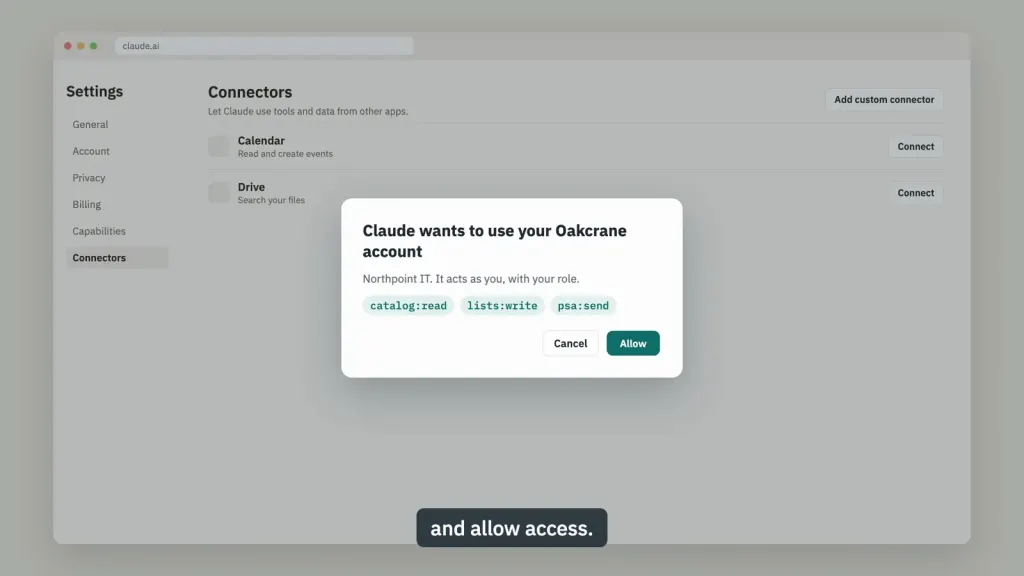
Click Connect next to Oakcrane. Sign in to Oakcrane and click Allow. The consent screen lists what Claude can do, such as read the catalog, write parts lists and send to your PSA, based on your role.
Using Claude Code instead? Run:
claude mcp add --transport http oakcrane https://oakcrane.com/api/mcpThen run
/mcpto sign in.Back in Oakcrane, click I've added it to Claude. The app now appears under Connected apps on the AI tools page.
4. Ask for a price
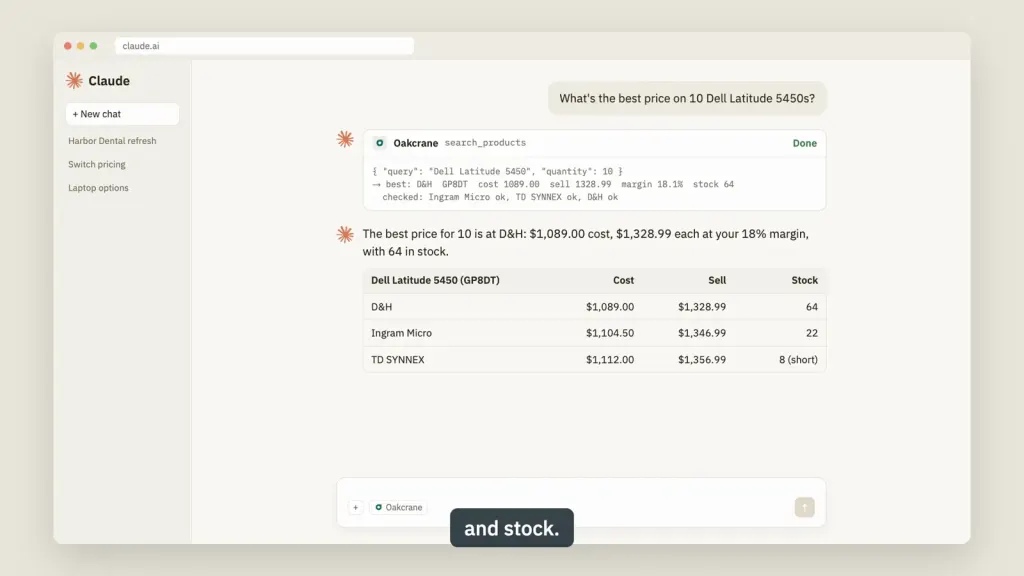
Start a new chat and just ask, for example: "What's the best price on 10 Dell Latitude 5450s?"
Claude calls Oakcrane, which checks Ingram Micro, TD SYNNEX and D&H live. It answers with cost, your sell price and stock at each distributor, and shows which Oakcrane tools it used.
5. Build a parts list
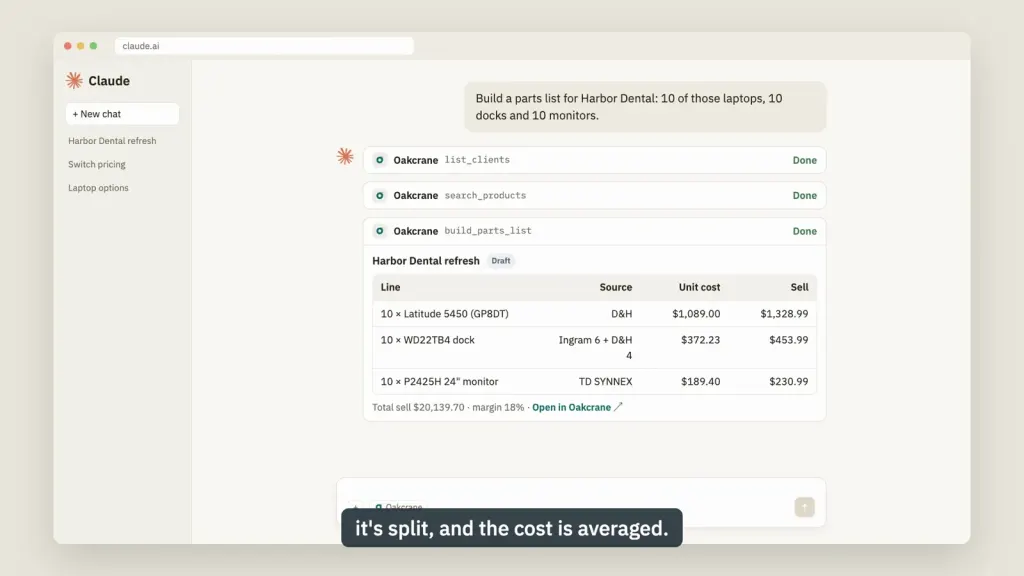
Then ask: "Build a parts list for Harbor Dental: 10 of those laptops, 10 docks and 10 monitors."
Claude builds a draft parts list in Oakcrane, priced at your margin. If no single distributor can ship a line, it is split across distributors and the cost is averaged.
It's a draft, so nothing is sent. Click Open in Oakcrane to review it. Claude only sends to your PSA after you say so, and every send can be undone within 10 minutes.
6. ChatGPT: add the connector
- In ChatGPT, turn on Developer mode under Settings, Apps & Connectors, Advanced settings.
- Choose Create, paste
https://oakcrane.com/api/mcpand pick OAuth. Leave the client credentials empty. - Sign in to Oakcrane when ChatGPT asks and click Allow.
- In a chat, choose Oakcrane from the tools menu and ask for hardware.
7. Copilot Studio: add an MCP tool
Copilot and Grok sign in with a personal API key.
- In Oakcrane, go to Settings, then API keys, and create a key. It's shown once, so copy it.
- In Copilot Studio, open your agent, then Tools, Add a tool, Model Context Protocol. Paste
https://oakcrane.com/api/mcpas the server address. - Add the header
Authorization: Bearer <your API key>. - Publish the agent to Microsoft 365 Copilot or Teams. Each person uses their own key.
8. Grok: add a remote MCP server
- Create an API key under Settings, API keys in Oakcrane, and copy it.
- Open Grok's connector settings and add a remote MCP server with
https://oakcrane.com/api/mcp. - Add the header
Authorization: Bearer <your API key>, then ask for hardware.
Tips
- Read tools, like searching products, run straight away. Write tools, like sending to your PSA, only run when you ask, and your AI checks with you first.
- Sending to your PSA needs the send permission. Admins choose which roles have it.
- Using your own AI never counts toward in-app limits.
Questions
What is the Oakcrane MCP URL?
https://oakcrane.com/api/mcp. It is the same for Claude, ChatGPT, Copilot Studio and Grok.
Can the AI send to my PSA without asking?
No. It builds drafts freely, but it only sends after you confirm in the chat. Your role must also have the send permission.
Does each person need their own connection?
Yes. Each person signs in with their own Oakcrane account, or uses their own API key, so the AI acts with that person's role.
Where do the prices come from?
Live from your own Ingram Micro, TD SYNNEX and D&H accounts, with your margin rules applied.
Transcript
0:03Oakcrane works inside the AI you already use.
0:06It's an MCP server, so Claude can search your distributors, price parts, and build parts lists for you.
0:13Claude signs in with your Oakcrane account and acts with your role.
0:17Every price comes live from your own distributor accounts, at your margin.
0:26In Oakcrane, open Settings, then AI tools.
0:30Pick Claude, and copy the connector URL.
0:39In Claude, open Settings, then Connectors, and choose Add custom connector.
0:44Name it Oakcrane, paste the URL, and leave the client ID and secret empty.
0:49Then click Add.
0:52Click Connect, sign in to Oakcrane, and allow access.
0:56Claude now acts as you.
1:02Now just ask.
1:03"What's the best price on 10 Dell Latitude 5450s?"
1:08Claude calls Oakcrane, which checks every distributor live, and answers with cost, your sell price, and stock.
1:20Then: "Build a parts list for Harbor Dental: with 10 of those laptops, 10 docks and 10 monitors."
1:28Claude builds a draft parts list in Oakcrane, priced at your margin.
1:32If no single distributor can ship a line, it's split, and the cost is averaged.
1:38It's a draft, so nothing is sent.
1:41Open it in Oakcrane to review.
1:43Claude only sends to your PSA after you say so.
1:48Using Chat GPT, The same URL works there.
1:52Turn on developer mode, add it as a connector, and sign in.
2:02That's how Oakcrane works inside Claude.
2:05Next, set your pricing and watch settings.


